Jump to content


Get Windows Live Mail! for free - no invite needed!


  • Please log in to reply
13 replies to this topic

#1 atsaunier

atsaunier

    Head Newsposter

  • Members
  • PipPipPipPip
  • 524 posts
  • Country:Usa

Posted 02 January 2006 - 06:42 PM

i was told this only works with an excisting account that was not opend recently

This was recently posted on Neowin but then was deleted. Any way, the thing is here: You can get a Windows Live Mail! account for free. It’s a small exploit that was discovered by someone (Post a comment If you discovered it, with proof), and It really works. (I tested it myself).

Alright, let’s start!

1) Open up Internet Explorer. MSN likes Internet Explorer, and hates Firefox. (Damn Microsoft!)
2) For this to work, you must be signed out of MSN. Go to the MSN Homepage, and double check you are signed out.
3) Copy this URL to Internet Explorer: Right Click On Here -> Copy
4) You should be redirected to another URL (Another URL to login). Sign in.
5) You should see the regular hotmail once signed in.
6) Once you see the regular hotmail, do Step #3 again. Copy the same URL above.
7) Click ‘Particpate’ on the bottom (Scroll down!) and walla!
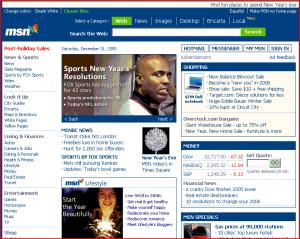

Attached Image: MSN_20Homepage.gif
Thats how MSN should look like. (except updated info)
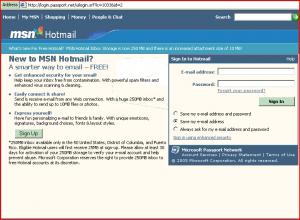
Attached Image: redirected_here.gif
The sign in screen after you did step 3.
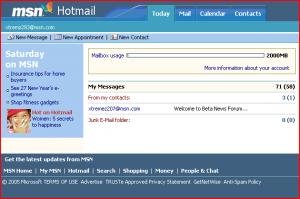
Attached Image: regular_hotmail.gif
Your signed in.

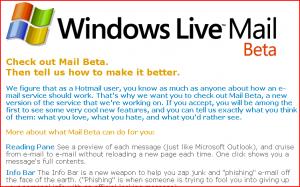
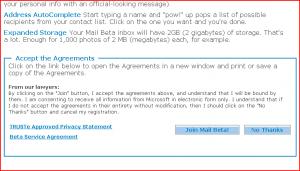
Attached Image: wlm_1.gif Attached Image: wlm_2.gif
This is step 6. Walla!

Make sure to submit this to Del.icio.us, and your favorite bookmarking sites! And for the email address in the screenshot, that is NOT my email address. It is mine, but I don’t use it.

P.S: It does work. Make sure your language/country in your settings is set to English, and America. I think Windows Live Mail! is for U.S. only, so that might be the issue. And be quick! Scroll down to where it says ‘Participate’ and click it!

>>>>Source:computerhelpforum.org

#2 Tommy

Tommy

    Advanced Member

  • Members
  • PipPipPip
  • 116 posts
  • Country:Estonia

Posted 02 January 2006 - 07:08 PM

working like a charm
thanks

#3 error51

error51

    Elite Newsposter

  • Newsposter
  • PipPipPipPip
  • 459 posts
  • Location:127.0.0.1
  • Country:USA

Posted 03 January 2006 - 03:45 AM

OOOO. AAAAA. Guess what it didn't work. I've had my hotmail address about 8 years. I live about 20 miles from Redmond. I followed the tutorial to the letter.

Posted Image

Edited by xCIAx, 03 January 2006 - 04:06 AM.


#4 atsaunier

atsaunier

    Head Newsposter

  • Members
  • PipPipPipPip
  • 524 posts
  • Country:Usa

Posted 03 January 2006 - 04:02 PM

several people are having this problem, some people it works, then some it dont, not sure 4 sure why

#5 RedInferno

RedInferno

    Your mom

  • Members
  • PipPipPipPipPipPip
  • 2,584 posts
  • Location:What's it to ya, bub?
  • Country:North America

Posted 03 January 2006 - 06:57 PM

LOL, sorry for wasting that invite then :D

#6 RedInferno

RedInferno

    Your mom

  • Members
  • PipPipPipPipPipPip
  • 2,584 posts
  • Location:What's it to ya, bub?
  • Country:North America

Posted 04 January 2006 - 02:09 AM

UPDATE: Well, I tried it at home, it didn't work for me either :D

#7 tnctx02

tnctx02

    Texas Problem Child

  • Members
  • PipPipPipPip
  • 338 posts
  • Location:The Lone Star State
  • Interests:Working on my trucks, and building pc's for friends.
  • Country:Texas

Posted 04 January 2006 - 03:55 AM

Worked like a Charm!!! Will the mail sign into this from now on??

#8 Neon

Neon

    Karl

  • Members
  • PipPipPipPipPipPip
  • 4,728 posts
  • Country:Space

Posted 04 January 2006 - 03:57 AM

if the trick worked for you, yes it should do.

#9 DJD

DJD

    Super Adv. Member

  • Members
  • PipPipPipPip
  • 383 posts
  • Country:NL

Posted 04 January 2006 - 01:36 PM

Does anyone have a screenshot of how it would look like?

Edited by DJD, 04 January 2006 - 02:37 PM.


#10 RedInferno

RedInferno

    Your mom

  • Members
  • PipPipPipPipPipPip
  • 2,584 posts
  • Location:What's it to ya, bub?
  • Country:North America

Posted 04 January 2006 - 07:06 PM

How'd you do it? I still get the plain old hotmail screen.

#11 DJD

DJD

    Super Adv. Member

  • Members
  • PipPipPipPip
  • 383 posts
  • Country:NL

Posted 04 January 2006 - 07:37 PM

Try it with a new account, and make sure your country settings are set to US

#12 gamer_pro_2000

gamer_pro_2000

    Advanced Member

  • Members
  • PipPipPip
  • 108 posts
  • Location:Michigan, USA
  • Country:United States

Posted 04 January 2006 - 08:37 PM

Mwhahahahahahahaha!!!!! This is awesome!!!! I'll post a screenie in a little while for everyone who doesn't have it :) Oh, and Red, IF you give me your account log-in, I'll set it up for you. What are friends for ol' chap? LOL!!!

Edited by gamer_pro_2000, 04 January 2006 - 08:41 PM.


#13 DJD

DJD

    Super Adv. Member

  • Members
  • PipPipPipPip
  • 383 posts
  • Country:NL

Posted 04 January 2006 - 09:06 PM

I am in to!!!!!!!!!!!!!! It took a while to set it up but it worked finaly!

Edited by DJD, 04 January 2006 - 09:06 PM.


#14 DJD

DJD

    Super Adv. Member

  • Members
  • PipPipPipPip
  • 383 posts
  • Country:NL

Posted 04 January 2006 - 09:20 PM

Al my work was for nothing look at this when i checked my mail!

Posted Image


0 user(s) are reading this topic

0 members, 0 guests, 0 anonymous users