

Maybe someone could help me out. I built a computer about a year ago with a gigabite motherboard, Im using Corsair Twinx RAM, but my BIOS is telling me my RAM is not optimized. The system runs fine, and is speedy, but this has always bugged me. Anyone know how to optimize this and get rid of the nagging message on bootup?
 0
0

RAM Timing
Started by
Nvyseal
, Jul 06 2006 05:53 PM
11 replies to this topic
#1
Nvyseal
-
- Administrator
-

- 9,830 posts
Chairman of the Board
- Location:From the whatever it is, Pluto
- Country:USA
Posted 06 July 2006 - 05:53 PM
#2
m.oreilly
-

- Admin
-
- 8,872 posts
rog'er wilco
- Country:lower uncton
Posted 06 July 2006 - 08:14 PM
 Nvyseal, on Jul 6 2006, 10:53 AM, said:
Maybe someone could help me out. I built a computer about a year ago with a gigabite motherboard, Im using Corsair Twinx RAM, but my BIOS is telling me my RAM is not optimized. The system runs fine, and is speedy, but this has always bugged me. Anyone know how to optimize this and get rid of the nagging message on bootup?
http://www.cpuid.com/cpuz.php
then you can enter your bios and manualy set things up. hopefully this is the issue,
unless the sticks you are using are mismatched in some way (same model#s,
different revision/chips/pcb...).
#3
Nvyseal
-
- Administrator
-
- 9,830 posts
Chairman of the Board
- Location:From the whatever it is, Pluto
- Country:USA
Posted 06 July 2006 - 08:54 PM
m.oreilly, on Jul 6 2006, 01:14 PM, said:
have you tried the app "cpuz" to get your native ram timings?
http://www.cpuid.com/cpuz.php
then you can enter your bios and manualy set things up. hopefully this is the issue,
unless the sticks you are using are mismatched in some way (same model#s,
different revision/chips/pcb...).
http://www.cpuid.com/cpuz.php
then you can enter your bios and manualy set things up. hopefully this is the issue,
unless the sticks you are using are mismatched in some way (same model#s,
different revision/chips/pcb...).
#4
Nvyseal
-
- Administrator
-
- 9,830 posts
Chairman of the Board
- Location:From the whatever it is, Pluto
- Country:USA
Posted 07 July 2006 - 03:53 AM
ok this is what i got... What else do i need? 
Attached Thumbnails
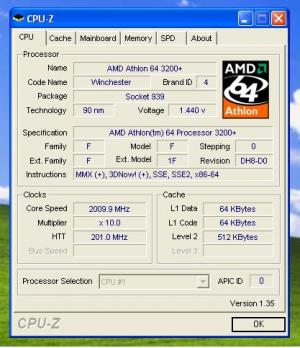
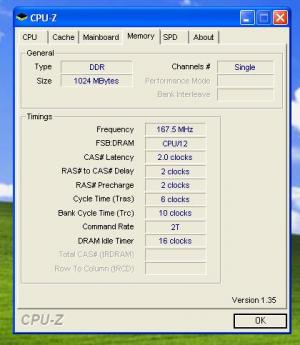
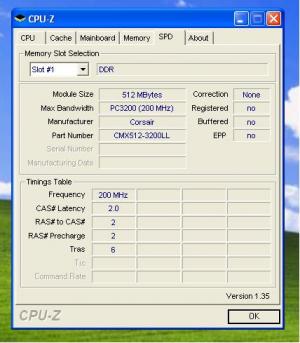
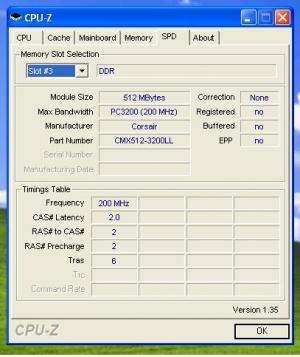
#5
m.oreilly
-
- Admin
-
- 8,872 posts
rog'er wilco
- Country:lower uncton
Posted 07 July 2006 - 05:53 AM
well, you are running it in single channel for starters (nf3-pro board?), and the weird thing is the frequency:
167.5 (should be 200). can you enter your bios, and manualy adjust the ram settings to fit the (third/fourth) pictures' "timings table"? you can also do a 1T with that lean ram. do you have the latest bios for that board?
167.5 (should be 200). can you enter your bios, and manualy adjust the ram settings to fit the (third/fourth) pictures' "timings table"? you can also do a 1T with that lean ram. do you have the latest bios for that board?
#6
Nvyseal
-
- Administrator
-
- 9,830 posts
Chairman of the Board
- Location:From the whatever it is, Pluto
- Country:USA
Posted 08 July 2006 - 03:55 AM
m.oreilly, on Jul 6 2006, 10:53 PM, said:
well, you are running it in single channel for starters (nf3-pro board?), and the weird thing is the frequency:
167.5 (should be 200). can you enter your bios, and manualy adjust the ram settings to fit the (third/fourth) pictures' "timings table"? you can also do a 1T with that lean ram. do you have the latest bios for that board?
167.5 (should be 200). can you enter your bios, and manualy adjust the ram settings to fit the (third/fourth) pictures' "timings table"? you can also do a 1T with that lean ram. do you have the latest bios for that board?
~Edit~ Could you explain to me what all my screenies mean? Thanks!
#7
m.oreilly
-
- Admin
-
- 8,872 posts
rog'er wilco
- Country:lower uncton
Posted 08 July 2006 - 05:11 AM
http://www.pcstats.c...eid=1639&page=2
is this it? single channel i'm afraid. these are the early s939 boards. you will see a boost editing the ram
timings though. your ram has great "lean" timings, great match for the on board memory controller of the athlon (they love lean and tight above loose and wide). with your investment in ram, and your existing gear,
a basic upgrade (NF4 mobo, DFI above all else) will usher you into a more "tweak friendly" setting. and dual channel. the early nv "gig" boards tend to eschew manual adjustments in favor of a software solution...
is this it? single channel i'm afraid. these are the early s939 boards. you will see a boost editing the ram
timings though. your ram has great "lean" timings, great match for the on board memory controller of the athlon (they love lean and tight above loose and wide). with your investment in ram, and your existing gear,
a basic upgrade (NF4 mobo, DFI above all else) will usher you into a more "tweak friendly" setting. and dual channel. the early nv "gig" boards tend to eschew manual adjustments in favor of a software solution...
#8
Nvyseal
-
- Administrator
-
- 9,830 posts
Chairman of the Board
- Location:From the whatever it is, Pluto
- Country:USA
Posted 08 July 2006 - 05:37 AM
no, not the GA-*** its this one... http://www.a1-electronics.net/AMD_Section/...NSNXP-939.shtml
I have dual channel
I have dual channel
#9
m.oreilly
-
- Admin
-
- 8,872 posts
rog'er wilco
- Country:lower uncton
Posted 08 July 2006 - 06:05 AM
Nvyseal, on Jul 7 2006, 10:37 PM, said:
no, not the GA-*** its this one... http://www.a1-electronics.net/AMD_Section/...NSNXP-939.shtml
I have dual channel
I have dual channel
 same board, but i didn't see the reference to dual channel
in my link ("just the NF3-250 with Socket 939 support in disguise", as in earlier mobos...even though the 4 slots are staring right at me...). you might try different slots in this regard, as it should do as advertised. and yes, the gig manuals have bent many a user
 a quick look with sandra or everesthome might give a different view, but cpuz usually does the trick here.
#10
Nvyseal
-
- Administrator
-
- 9,830 posts
Chairman of the Board
- Location:From the whatever it is, Pluto
- Country:USA
Posted 23 August 2006 - 02:30 AM
Ya know, im still having problems with this, i have the new BIOS on but the RAM only works in 2 particular slots of the slots anyone got any clues? and by the hits this thread has received, it looks like others have the same problem
#11
simon
-

- Members
-
- 739 posts
simon says Post
- Location:Buffalo,New York, USA
- Country:USA
Posted 23 August 2006 - 06:42 AM
im puzzled with this tooo I will think about it get back to it
#12
m.oreilly
-
- Admin
-
- 8,872 posts
rog'er wilco
- Country:lower uncton
Posted 23 August 2006 - 06:54 AM
get a dfi mobo? 


0 user(s) are reading this topic
0 members, 0 guests, 0 anonymous users

